
CamCollect2.4 - Download
You'll be able to download in few seconds.
Publisher Description
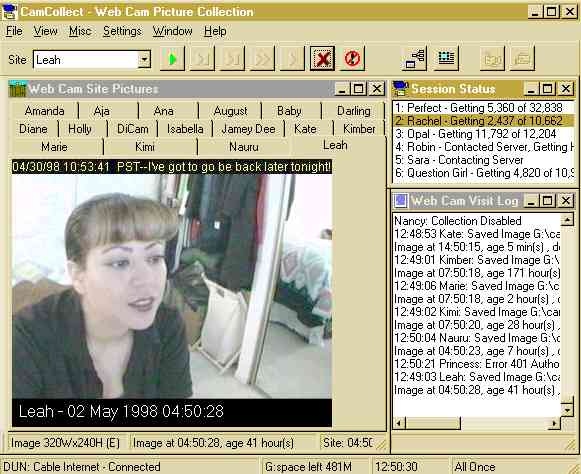
CamCollect for Windows will download, display and save images from the
many thousands of webcams available on the internet. CamCollect monitors
up to 1,000 pre-defined webcam sites, only downloads new images to save
web bandwidth, supports authentication for members only sites, and
contacts up to 16 webcam sites simultaneously to maximise internet usage
and stop dead or slow sites effecting collections. Optionally, captured
images are shown in a thumbnail window allowing rapid viewing.
Images may be automatically enhanced before being displayed, captioned
with site name and time, and automatically saved on disk, with file names
based on the date and time (fully customisable) or with sequential
numbers. CamCollect supports various techniques to overcome the
anti-piracy schemes used by many webcams to prevent their images being
linked from other sites. Streaming cams from sites such as Camarades
may be captured as a series of stills.
A built-in image editor allows images to be viewed enlarged, cropped,
have text added, be colour corrected, filtered or enhanced, and saved in
various image formats. A single button launches a web browser for the
webcam site's home page, and webcam site information can be imported
from a text file to allow rapid set-up, and saved to text files to share
with others.
CamCollect is shareware, developed by Magenta Systems Ltd, in England.
Until registered, CamCollect will stop automatically capturing webcam
pictures after five minutes, but may still be used to capture single
pictures. CamCollect Release 2 registration costs 25 (UKP) which is
about US$37 or 42 Euro. Existing users of CamCollect Release 1 may
upgrade to Release 2 for 15 (UKP).
About CamCollect
This Video Tools program is available in English. It was last updated on 29 September, 2026. CamCollect is compatible with the following operating systems: Windows.
The company that develops CamCollect is Magenta Systems Ltd. The latest version released by its developer is 2.4.
The download we have available for CamCollect has a file size of 1.0 MB. Just click the green Download button above to start the downloading process. The program is listed on our website since 2008-07-13 and was downloaded 0 times. We have already checked if the download link is safe, however for your own protection we recommend that you scan the downloaded software with your antivirus. Your antivirus may detect the CamCollect as malware if the download link is broken.
How to install CamCollect on your Windows device:
- Click on the Download button on our website. This will start the download from the website of the developer.
- Once the CamCollect is downloaded click on it to start the setup process (assuming you are on a desktop computer).
- When the installation is finished you should be able to see and run the program.
Program Details
System requirements
Download information
Pricing
Version History
version 2.4
posted on 2008-07-13
Major rewrite, new thumbnails window
Disclaimer
External Download
We do not host CamCollect on our servers. We did not scan it for viruses, adware, spyware or other type of malware. This app is hosted by the software publisher and passed their terms and conditions to be listed there. We recommend caution when installing it.
The external download link for CamCollect is provided to you by apps112.com without any warranties, representations or guarantees of any kind, so access it at your own risk.
If you have questions regarding this particular app contact the publisher directly. For questions about the functionalities of apps112.com contact us.
